
When a tool asks, “How many people are in the image you want to upload?”, it may seem like a simple question. But in reality, this information can make a major difference in how well the final result turns out.
Whether the goal is image restoration, AI photo enhancement, photo editing, or style transformation, telling the system how many people appear in the uploaded image helps the process become more accurate, more consistent, and more reliable.
In this article, you will understand why this step matters so much and how it can improve the final image quality.
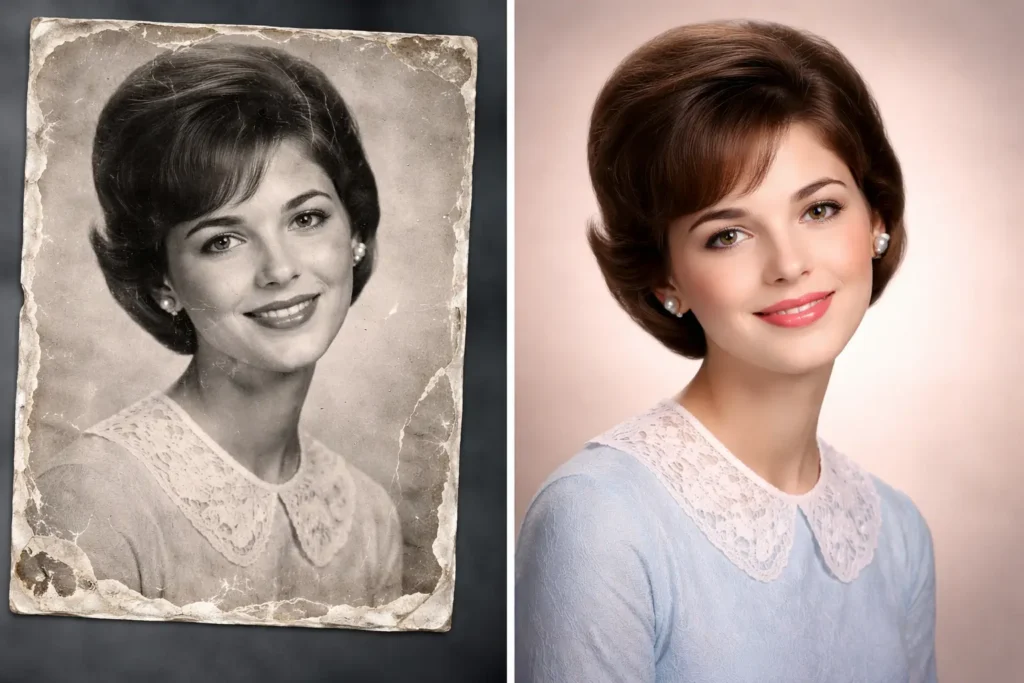
Why does the number of people in the image matter?
Artificial intelligence tools often need context before processing a photo. One of the most important pieces of context is knowing how many people are present in the uploaded image.
This matters because the AI needs to understand:
- how many faces it should detect
- how many bodies or subjects it should preserve
- whether the image is a solo portrait or a group photo
- how to maintain facial consistency
- how to avoid deleting, duplicating, or distorting people
Without this information, the system may need to guess. And when AI guesses wrong, the results can become much less accurate.
What can go wrong if this information is missing?
If the user does not provide the correct number of people in the image, several issues may happen during processing.
For example:
- one person may be accidentally removed
- a face may be blended with another person
- the system may focus on only one subject and ignore the others
- a group image may be treated like a single portrait
- facial details may become inconsistent
- the composition may look unnatural after enhancement or restoration
This is especially important in family photos, couple photos, old portraits, and group images where preserving every person correctly is essential.
Why this is important for image restoration
In image restoration, the AI tries to recover lost detail, improve sharpness, repair damage, and sometimes colorize old photos. If there is more than one person in the image, the system needs to know that each person matters.
That information helps the tool:
- preserve all visible people
- restore multiple faces more accurately
- avoid giving too much priority to only one face
- improve balance across the whole image
- maintain the original structure of the photo
For example, if an old family picture contains four people but the tool assumes there is only one main subject, the restoration may end up favoring a single face while leaving the others soft, distorted, or poorly reconstructed.
Why this is important for AI-generated edits
The same logic applies to AI edits and transformations. If someone uploads an image to create a stylized version, a cleaned-up version, or a creative reinterpretation, the AI must know how many people it should keep in the scene.
This helps prevent problems such as:
- turning two people into one
- changing the position of the subjects incorrectly
- creating extra people who were not there
- misreading children and adults in the same image
- failing to preserve the intended relationship between the subjects
In other words, this small detail helps the AI respect the original photo more closely.
A simple question that improves accuracy
The question “How many people are in the image you want to upload?” is important because it reduces ambiguity.
AI systems perform better when the input is clear. The more precise the instruction, the better the result tends to be. That is why this type of question should not be seen as unnecessary. It is actually one of the easiest ways to improve image processing quality before the upload is even analyzed.
This is particularly useful when the photo includes:
- children and adults together
- partially visible faces
- overlapping people
- damaged or faded subjects
- low-resolution group photos
- old black-and-white family pictures
In those situations, the number of people gives the system an important starting point.
Better results start with better input
Many users focus only on the final result, but AI image tools depend heavily on the quality of the input. Good results do not come only from strong technology. They also come from clear guidance.
When the user informs how many people are in the uploaded photo, the tool gains a better chance to:
- identify all subjects correctly
- apply restoration more evenly
- preserve facial identity
- maintain a natural composition
- produce a result closer to the original image
That is why this small step can have such a big impact.
Why this matters even more in old or damaged photos
In older images, it is often harder for AI to detect people correctly. Photos may be faded, scratched, blurry, low-contrast, or partially damaged. In those cases, facial detection becomes more difficult.
By telling the system how many people are in the image, the user helps compensate for those limitations. This makes the restoration process smarter and can reduce mistakes.
For old family archives, this is especially valuable. Many people want to preserve not just a single face, but the memory of everyone in the photo.
A better user experience
From a product and interface perspective, asking the user how many people are in the uploaded image is also good design.
It helps:
- set clearer expectations
- improve processing decisions
- reduce user frustration
- increase trust in the result
- make the final output feel more intentional
Instead of leaving everything to AI interpretation, the system involves the user in a simple but meaningful way.
Should users answer this accurately?
Yes. The more accurate the answer, the better the chances of getting a strong result.
If the uploaded image contains one person, the tool can treat it like a portrait. If it contains multiple people, the system can distribute attention more appropriately. That alone can change the outcome significantly.
Even when the image is blurry or damaged, giving the correct number of people helps the model process the photo with better awareness.
Conclusion
At first glance, “How many people are in the image you want to upload?” may sound like a basic question. But it plays an important role in improving image restoration, AI enhancement, and photo transformation results.
This information helps the system understand the structure of the image, preserve all visible subjects, and avoid common mistakes such as missing faces, distorted people, or uneven restoration.
In short, it is a small detail that can have a big effect on the final image quality. When users provide this information correctly, the tool has a much better chance of delivering a cleaner, more accurate, and more satisfying result.